Инструкция
Best Torrent Clients for Android in 2026: 6 Apps Compared
Updated September 12, 2026
This article compares six popular BitTorrent clients for Android — apps that let you manage torrent downloads directly on your phone or tablet, with no laptop involved. Whether you want a "install and forget" experience or fine control over speed limits, schedules and RSS feeds, one of these should fit.
Note on legality: downloading or sharing copyrighted material without the rights holder's permission is illegal in most countries. Use these clients for content under permissive licenses (Creative Commons, Linux distributions, freeware) or files you own the rights to. See the Safety and legal notes section for details.
Most Android torrent clients are free, though many use ads or a freemium model with a paid tier that removes ads and unlocks extra features. In each review below we call out ads, Russian/English localization, magnet-link support, RSS, advanced options, and availability in official app stores.
Contents
- Quick pick
- tTorrent Lite — lightweight power user's client
- µTorrent — the familiar name
- BitTorrent — official client with queue control
- Flud — the balanced default
- Vuze Torrent Downloader — install-and-go
- LibreTorrent — open source, no ads
- Comparison table
- How to choose an Android torrent client
- Safety and legal notes
Quick pick
- Simple, no-fuss client — Flud, µTorrent, Vuze.
- No ads at all — LibreTorrent (open source, ad-free) or the paid versions of tTorrent Pro and Flud Pro.
- Advanced settings — speed limits, scheduling, RSS — tTorrent, BitTorrent, µTorrent, Flud.
- Broad protocol support (magnet, DHT, UPnP, encryption, proxy) — tTorrent, Flud, µTorrent, BitTorrent, LibreTorrent.
- Older or low-end phones — the lighter clients: Vuze, Flud, LibreTorrent.
- Privacy and open source — LibreTorrent, also available on F-Droid.
tTorrent Lite — lightweight power user's client
| App | tTorrent Lite |
| Developer | tagsoft |
| Official page | Google Play |
tTorrent is one of the best-known torrent clients on Android and one of the most feature-complete.
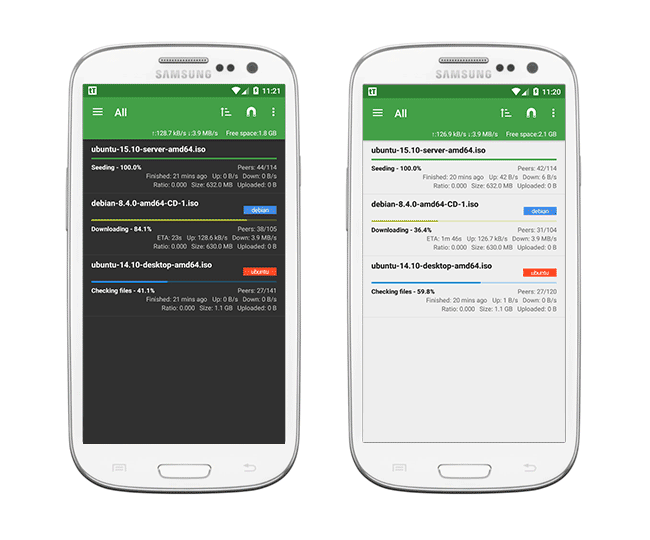
tTorrent supports protocol encryption, several connection modes and file transfers over SOCKS and HTTP proxies. It has a built-in torrent search, so you don't have to jump to the browser for every download, and it integrates with the OS: torrent files and magnet links opened in the browser hand off directly to the app.
You get parallel downloads with per-torrent priority, a global queue, and separate limits for download and upload bandwidth. There are multiple connection modes, including Wi-Fi only, which keeps mobile data usage in check.
Bandwidth caps can be applied on a schedule — for example, uncapped overnight, throttled during work hours — configured from the settings screen.
The client also supports RSS feeds (useful for podcasts and TV releases), UPnP, and NAT-PMP for automatic port forwarding.
In the free Lite version, download speed is capped and ads are shown. If you want unrestricted speed and no ads, upgrade to tTorrent Pro.
Verdict: a powerful, flexible client that shines when you want fine control over speed, queue order and scheduling. The downsides are ads and the speed cap in the Lite version, plus a slightly busier UI than the simplest alternatives.
µTorrent — the familiar name
The official mobile µTorrent client from the maker of the well-known Windows app.
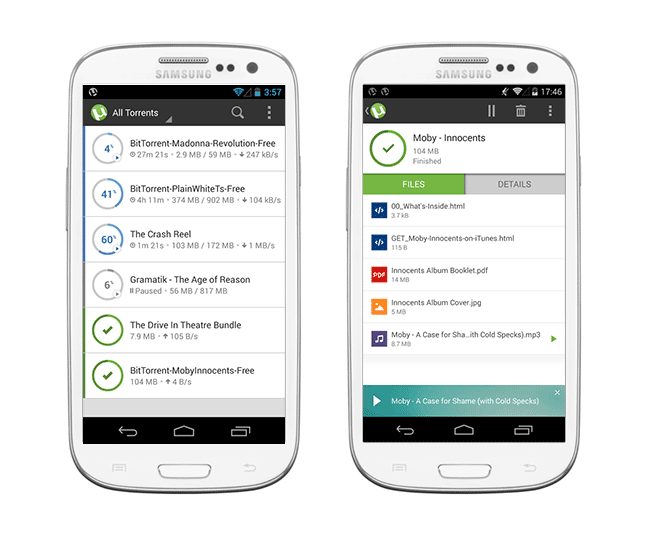
Mobile µTorrent is consistently among the top downloads in its category on Google Play.
See also: How to remove ads in µTorrent
Highlights of µTorrent for Android:
- Downloads can be saved to an external SD card (where supported) or internal storage.
- Built-in media player for music and video on your phone.
- Fast, mature core built on BitTorrent's original technology.
- Clean, uncluttered UI.
- Configurable download location, source, and file format.
- Remove individual torrents or their data straight from the app — no need to open a file manager.
- Available in English, Russian and dozens of other languages.
- Wi-Fi-only mode saves battery and cellular data.
Tip: use Wi-Fi only for large files whenever possible — it saves cellular data and is much easier on the battery. In µTorrent's settings, disable downloads over mobile data and, if needed, tune background behavior.
Other useful bits:
- Add downloads from inside the app or straight from a browser.
- Works on both phones and tablets.
- No client-side caps on speed or file size.
- Full support for
.torrentfiles and magnet links. - RSS feed subscriptions.
µTorrent shows ads and, on some builds, content recommendations. To avoid tampered or malicious copies, only install it from Google Play, never from random APK sites.
BitTorrent — official client with queue control
BitTorrent is the official client from the company that created the protocol. It downloads torrent files and plays media through a built-in video player.
It's a cross-platform product — versions exist for both desktop and mobile with a similar look and feel.
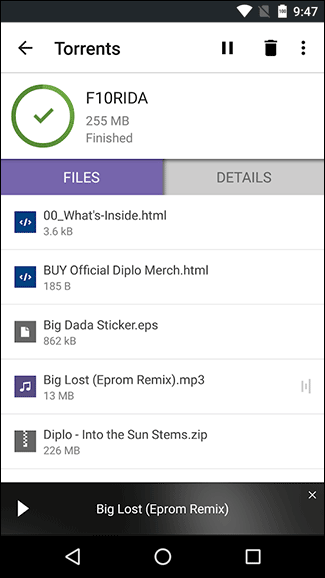
Highlights:
- Downloads both
.torrentfiles and magnet links. - No client-side caps on size or speed.
- Deferred downloads: queue a torrent to start later — helpful when storage is tight.
- Configurable save folder.
The paid version is ad-free and adds power-saving conveniences such as auto-shutdown after all downloads finish.
Pros and cons on Android
- Pros: official app from the protocol's creators; clean interface; built-in media player; support for magnet links and download queues.
- Pros: cross-platform — similar workflow across desktop and mobile.
- Cons: ads in the free version.
- Cons: the interface can feel busy if all you need is the basics.
Available on Google Play.
Flud — the balanced default
Flud markets itself as a simple, good-looking, and functional torrent client, and it delivers on all three. There are no artificial caps on download speed or file size, and the app stays light on system resources.
Core features:
- Speed and control: no client-side limits on speed or file size; separate up/down throttles; per-torrent priorities; sequential and partial downloads.
- Protocols and features: magnet links, DHT, UPnP, NAT-PMP, protocol encryption, proxy support.
- Extras: selective file download inside a torrent, IP filtering, download sorting, RSS feeds for automatic new-episode grabs.
Keep in mind that per-file size limits can come from the storage's filesystem — FAT32, for example, caps individual files at roughly 4 GB. This is the filesystem's constraint, not Flud's; save large files to internal storage or an exFAT/ext4 volume instead.
Flud comes in a free version with ads and a paid version without them. For most Android users this is the sweet spot: enough features for advanced needs, but the UI stays simple. Official page: Google Play.
Vuze Torrent Downloader — install-and-go
Vuze Torrent Downloader is a lightweight client built around "install it and start downloading" — no deep configuration required. The interface is deliberately minimal.
Highlights:
- Search and add torrents in a couple of taps.
- Adjustable download and upload speeds.
- Wi-Fi-only mode to protect your mobile data.
- Basic scheduling with automatic pause under set conditions.
- Little in the interface beyond what you actually need.
Vuze suits people who want a clean, distraction-free client that just runs downloads without asking many questions.
LibreTorrent — open source, no ads
LibreTorrent is a free, open-source torrent client released under GPLv3. It's built on the well-established libtorrent4j library and maintained by an active community. This is the go-to option if you want zero ads, no tracking, and auditable code.
Key features:
- Completely free, no ads, no in-app purchases.
- Magnet links, DHT, PEX, LSD, protocol encryption.
- Fine-grained speed limits, throttles and per-torrent priorities.
- Wi-Fi-only mode and scheduling.
- Selective file download inside a torrent; multiple parallel downloads.
- Localized in many languages; dark theme.
LibreTorrent is available on Google Play and on F-Droid. The obvious pick if privacy and openness matter to you.
Comparison table
| Client | Ads / paid tier | Magnet links | RSS / auto-download | Speed limits / scheduling | English UI | Best for |
|---|---|---|---|---|---|---|
| tTorrent | Ads in Lite; Pro is ad-free | Yes | Yes | Flexible limits, scheduling | Yes | Power users |
| µTorrent | Ads; paid tier available | Yes | Yes (RSS) | Speed limits, Wi-Fi only | Yes | Beginners and experienced users |
| BitTorrent | Ads; paid tier is ad-free | Yes | Depends on version | Speed limits, queue | Yes | Media use and general tasks |
| Flud | Ads; Pro is ad-free | Yes | Yes (RSS) | Flexible speed limits | Yes | Balanced default pick |
| Vuze | Minimal ads | Yes | No full RSS | Basic limits and scheduling | Yes | Beginners; lightweight use |
| LibreTorrent | Free, ad-free, open source | Yes | No | Flexible limits and scheduling | Yes | Privacy and free software |
How to choose an Android torrent client
- Decide whether you need a built-in media player. If you want to preview video and audio without leaving the app, look at µTorrent and BitTorrent.
- Decide how much you can tolerate ads. If you don't want to see any, pick a paid tier (tTorrent Pro, Flud Pro) or the fully open-source LibreTorrent.
- Match the client to your hardware. For older or low-end phones, lighter clients (Vuze, Flud, LibreTorrent) will feel snappier. Any of the six work fine on current-generation devices.
- Think about the features you'll actually use. For RSS and auto-download, choose tTorrent, Flud or µTorrent. For advanced protocol options and detailed settings, go with tTorrent.
- Turn on Wi-Fi-only mode and tune background limits so downloads don't devour your mobile data or drain the battery overnight.
- Check availability in the official store for your region and device, and avoid sideloaded APK files from unknown sources.
- Try one or two clients side by side. Interface preference matters more than a feature list — settle on the one you actually enjoy using every day.
Safety and legal notes
Downloading or sharing files over BitTorrent can violate copyright law if the material is protected and shared without the rights holder's permission. In most countries this carries civil or, in some cases, criminal consequences. Use torrent clients for content under open licenses — for example, works released under Creative Commons, free-software distributions (Linux ISOs, LibreOffice and so on) — or material you own the rights to.
On public or unencrypted Wi-Fi, take basic precautions to protect your traffic and privacy. The Electronic Frontier Foundation publishes practical guidance on network privacy and P2P traffic.
Install torrent clients only from official app stores (Google Play, F-Droid) or the developer's own site. APK files from third-party sources are a frequent vehicle for malware and unwanted bundles. Review each app's permissions from time to time and make sure it only has access to what it actually needs; Google's Android security guidance is available in the Help Center.
Technical details about the protocol itself, including the full specification, are available at bittorrent.org.
Помощь
Не нашли ответ?
Опишите проблему — подскажем, куда двигаться дальше, и по возможности дополним материал.
Комментарии
Загружаем обсуждение…